Posts

Create a SharePoint group and add users using JSOm

Below code will create a sharegroup and adds login user and a static user to the group.    <div>       <h1>Create SharePoint Group </h1>       <br />       <input id="btnCreateCustomGroup" type="button" value="Create SPGroup" />     </div>     <script src="/Style%20Library/Scripts/jquery-1.12.1.js"></script>      <script src="/_layouts/15/sp.js" type="text/javascript"></script>     <script src="/_layouts/15/SP.RequestExecutor.js" type="text/javascript"></script>     <script src="/_layouts/15/SP.search.js" type="text/javascript"></script>     <script type="text/javascript">     $(function() {       $('#btnCreateCustomGroup').click(btnCreateCustomGroup_Click);  ...
Comparing Windows Kerberos and NTLM Authentication Protocols

1. Kerberos is faster than NTLM: Pass through is not applicable to Kerberos. 2. In Kerberos authentication both client and server are authenticated mutually. In NTLM one client is validated, which allows intruders can get the client response.s 3. Kerberos is a open standard NTLM is  proprietary  to Microsoft. 4. Kerberos allows delegation, NTLM(double hop problem because of this) do not. 5. Kerberos supports Smart Card logon, NTLM do not. These are beautifully explained in below article. Ref: http://windowsitpro.com/security/comparing-windows-kerberos-and-ntlm-authentication-protocols

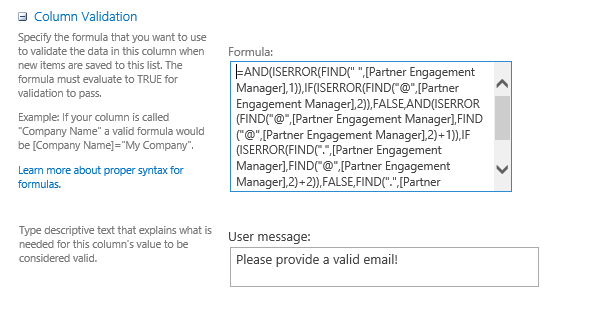
Email Validation for SharePoint list column

Image
Please use the below formula in [Column validation] of the list column edit section. Please replace the [Email] with your column name. Formula: --------------------------------------------------------------------- =AND(     ISERROR(FIND(" ", [Email],1)),     IF(ISERROR(FIND("@", [Email],2)),         FALSE,         AND(             ISERROR(FIND("@",[Email], FIND("@", [Email],2)+1)),             IF(ISERROR(FIND(".", [Email], FIND("@", [Email],2)+2)),                 FALSE,                 FIND(".", [Email], FIND("@", [Email],2)+2) < LEN([Email])             )   ...

Hide New Item button from SharePoint 2010 Ribbon

Please add the following CSS style in page head content place holder of corresponding list view using a style tag: #Ribbon\.ListItem\.New\.NewListItem-Large{Display:none;} It's pretty easy, find the corresponding control id using developer tool and set it's display property value to  none. In similar way you can hide any action item on the ribbon.

Reset people picker value in SharePoint using JQuery

Use the following code to reset the people picker control value using JQuery: Pass the title of the people picker to the below function and it will reset the people picker control value. function clearPeoplePickerControl(ppTitle) { var identifier = $("div[title='" + ppTitle + "']").attr("ID")); ; var value = ''; var tags = document.getElementsByTagName('DIV'); for (var i = 0; i < tags.length; i++) {   var tempString = tags[i].id;  if ((tempString.startsWith(identifier)) && (tempString.indexOf('_upLevelDiv') > 0)) {       tags[i].innerHTML = value;      break; }
Promote Multiple-Selection list box values with coma saperated value to Form Library Suppose, in InfoPath 2010 form with a Multiple-Selection List Box that's pulling in data from a SharePoint list. To publish form and promote Multiple-Selection List Box to library, please follow the below steps: 1. Named multiple selection field Field1. Add 1 more hidden text fields: Field2. 2. Add this formula as the default value for Field2. xdMath:Eval(xdMath:Eval(/my:myFields/my:group1/my:field1, 'concat(., ",")'), "..") Here "/my:myFields/my:group1/my:field1" is my multiple selection field, please replace the XPath for yours. or substring(eval(eval(field6[. != ""], 'concat(",", .)'), ".."), 2) 3. Done. Field2 is the field we need to publish as SharePoint column.

Unable to upload files to SharePoint 2010 document library

Problem : when i tried to upload files to a document library i was getting an error as follows: The URL ' / ' is invalid.  It may refer to a nonexistent file or folder, or refer to a valid file or folder that is not in the current Web. Log provided the insights: ---------------------------------------------- SPFarm.ExternalBinaryStoreClassId is set to {5325e459-aec3-48fe-b928-0a160cd860de} but class is not registered SPFarm.ExternalBinaryStoreClassId is set to {5325e459-aec3-48fe-b928-0a160cd860de} but class is not registered. Exception = System.IO.FileNotFoundException: Retrieving the COM class factory for component with CLSID {5325E459-AEC3-48FE-B928-0A160CD860DE} failed due to the following error: 8007007e.     at System.RuntimeTypeHandle.CreateInstance(RuntimeType type, Boolean publicOnly, Boolean noCheck, Boolean& canBeCached, RuntimeMethodHandle& ctor, Boolean& bNeedSecurityCheck)     at System.RuntimeType.CreateInst...